Paper sizes in Word are set on the Layout tab, and the two you will meet most are A4 (210 × 297 mm) and US Letter (8.5 × 11 in). Pick the wrong one and pages print with odd margins or cut-off text, so it is worth setting before you start — and if you work on Long Bond paper, see how to set Long Bond paper size in Word.
In this guide, you’ll learn the exact size of every common paper in inches and millimetres, which countries use which, how to change the paper size and how to make it the default. Everything here applies to Word for Windows in Microsoft 365, Word 2021, 2019 and 2016.
Paper Sizes in Word at a Glance
A4
8.27 × 11.69 in · 210 × 297 mm
Standard paper almost everywhere outside North America
Letter
8.5 × 11 in · 215.9 × 279.4 mm
Standard paper in the US, Canada and Mexico
Legal
8.5 × 14 in · 215.9 × 355.6 mm
Contracts and forms in North America
Long Bond
8.5 × 13 in · 215.9 × 330.2 mm
Schools and offices in the Philippines (custom size in Word)
A3
11.69 × 16.54 in · 297 × 420 mm
Posters, charts, two A4 pages side by side
A5
5.83 × 8.27 in · 148 × 210 mm
Booklets, flyers, notebooks (half of A4)
Tabloid
11 × 17 in · 279.4 × 431.8 mm
Large US prints (double Letter)
Executive
7.25 × 10.5 in · 184.2 × 266.7 mm
Some US letterheads
Statement
5.5 × 8.5 in · 139.7 × 215.9 mm
Half of US Letter
B4 (JIS)
10.12 × 14.33 in · 257 × 364 mm
Japanese forms
B5 (JIS)
7.17 × 10.12 in · 182 × 257 mm
Japanese notebooks and books
👉 Word’s Size menu shows the measurements in your own units, so in the UK or Europe you will see cm, as in the screenshot below.
How to Change Paper Size in Word
Steps:
- Go to the Layout tab.
- Click Size.
- Choose a size from the list, such as A4 or Letter.
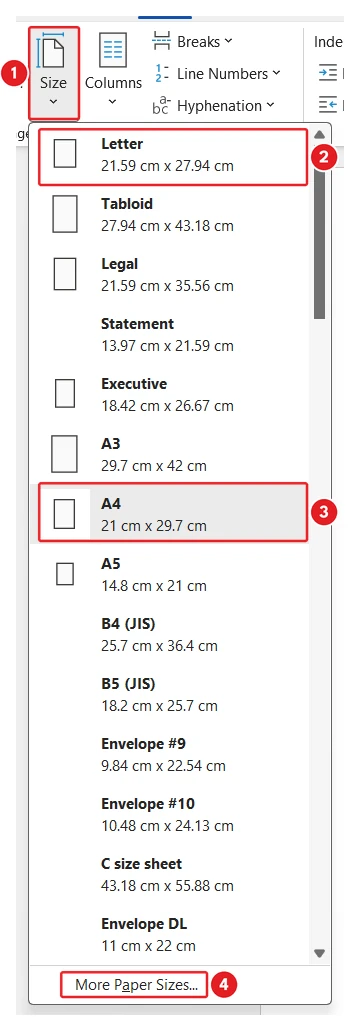
👉 The list depends on your printer, so a size your printer cannot handle may be missing. Use More Paper Sizes for anything not listed.
How to Set a Custom Paper Size
Steps:
- Go to Layout > Size > More Paper Sizes.
- On the Paper tab, type the Width and Height.
- Check Apply to says Whole document (or This section).
- Click OK.
👉 Long Bond is set this way: width 8.5 in, height 13 in. Word may show it as Custom size.
How to Make a Paper Size the Default
Word starts new documents in the size your copy of Word was set up with — usually Letter in North America and A4 elsewhere. To change it for every new document, open More Paper Sizes, pick the size and click Set As Default, then Yes. The full walkthrough is in how to set A4 as default in Word.
A4 vs Letter: What Is the Difference?
A4 is slightly narrower and taller: 210 × 297 mm against Letter’s 215.9 × 279.4 mm. A Letter document printed on A4 leaves a gap at the bottom; an A4 document printed on Letter can lose its last lines. If you share files between the UK and the US, check the size under Layout > Size before printing, or save as a PDF so the page shape travels with the file.
Common Paper Size Problems
- The printer asks for a different paper: the document size and the paper in the tray do not match. Change one of them.
- Only some pages changed size: the document has sections. Use Apply to: Whole document, or see section breaks in Word.
- Text runs off the page after changing size: check the margins and any tables or pictures wider than the new page.
FAQs
What size is A4 in inches?
A4 is 8.27 × 11.69 inches, which is 210 × 297 mm.
What size is Letter paper in mm?
US Letter is 215.9 × 279.4 mm, which is 8.5 × 11 inches.
What size is Legal paper?
Legal is 8.5 × 14 inches, which is 215.9 × 355.6 mm.
What size is Long Bond paper?
Long Bond is 8.5 × 13 inches (215.9 × 330.2 mm). Set it in Word with More Paper Sizes.
Why is A4 missing from my Size list?
The list comes from your printer. Use More Paper Sizes and type 210 mm by 297 mm.
How do I change the paper size for one page only?
Put section breaks around the page, then change the size with Apply to: This section.
Conclusion
Paper sizes in Word take seconds to set and save a lot of printing trouble. A4 and Letter cover most documents; the table above has the rest.
Set your usual size as the default, and for a different size on one page only, combine it with section breaks in Word.
Related Tutorials
- How to Set A4 as Default in Word
- How to Set Long Bond Paper Size in Word
- How to Change Page Size in Word
Word Tutorials
Recently Added on Word Made Easy
Browse the complete collection for help with formatting, layout, pages, tables, images, and document setup.
For Microsoft support documentation, visit the official Microsoft guidance.
Leave a Reply