
To double space in Google Docs, select your text, click the Line & paragraph spacing button in the toolbar and choose Double. It takes two clicks, and it is the setting most teachers ask for in essays, just like double line spacing in Word.
In this guide, you’ll learn four ways to double space in Google Docs: the toolbar button, the Format menu, a custom spacing value, and how to make double spacing the default for every new document. The steps are for Google Docs in a web browser on Windows or Mac.
What Is Double Spacing in Google Docs?
Double spacing makes each line of text twice the height of a single-spaced line. The extra white space makes long text easier to read and leaves room for handwritten comments. New Google Docs documents use 1.15 spacing, so you need to double space in Google Docs yourself.
Double spacing is often required for:
- School and university essays
- MLA and APA format papers
- Manuscripts and drafts that someone will mark up by hand
Method 1: Double Space in Google Docs With the Toolbar
This is the fastest way to double space in Google Docs, and the one to use for most documents.
- Click anywhere in your document, then press Ctrl + A (Cmd + A on a Mac) to select all your text. To change only some paragraphs, drag across them instead.
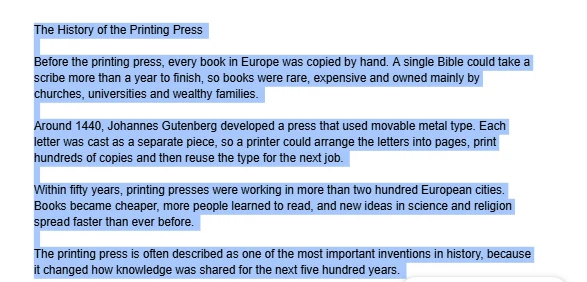
👉 The selected text turns blue.
- Click the Line & paragraph spacing button in the toolbar. It looks like lines with an up-and-down arrow, next to the alignment buttons.
- Choose Double.
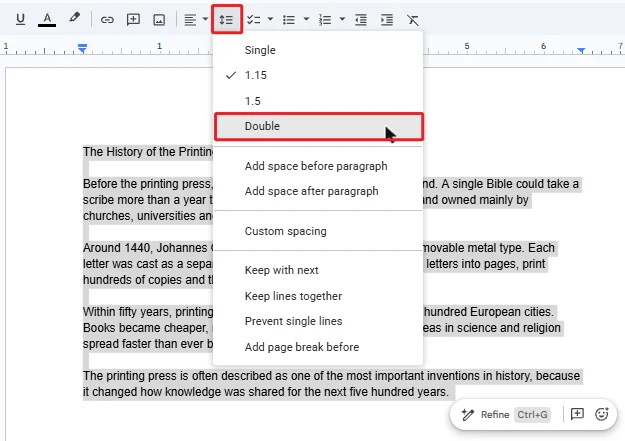
👉 Your text is now double spaced. That’s it: two clicks, and a tick appears next to Double the next time you open the menu.

Method 2: Double Space in Google Docs From the Format Menu
Use this if you cannot find the spacing button, for example when the toolbar is narrow and the button is hidden behind the three-dot More icon.
- Select the text you want to double space.
- Select Format > Line & paragraph spacing.
- Choose Double.
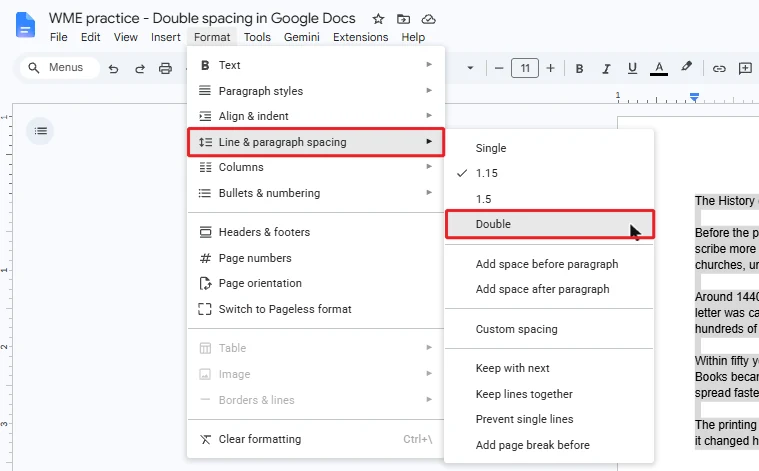
👉 The result is exactly the same as Method 1.
Method 3: Double Space in Google Docs With Custom Spacing
Use custom spacing to double space in Google Docs with an exact value, or to check that your text really is set to 2.
- Select your text.
- Select the Format menu at the top, point at Line & paragraph spacing, then select Custom spacing.
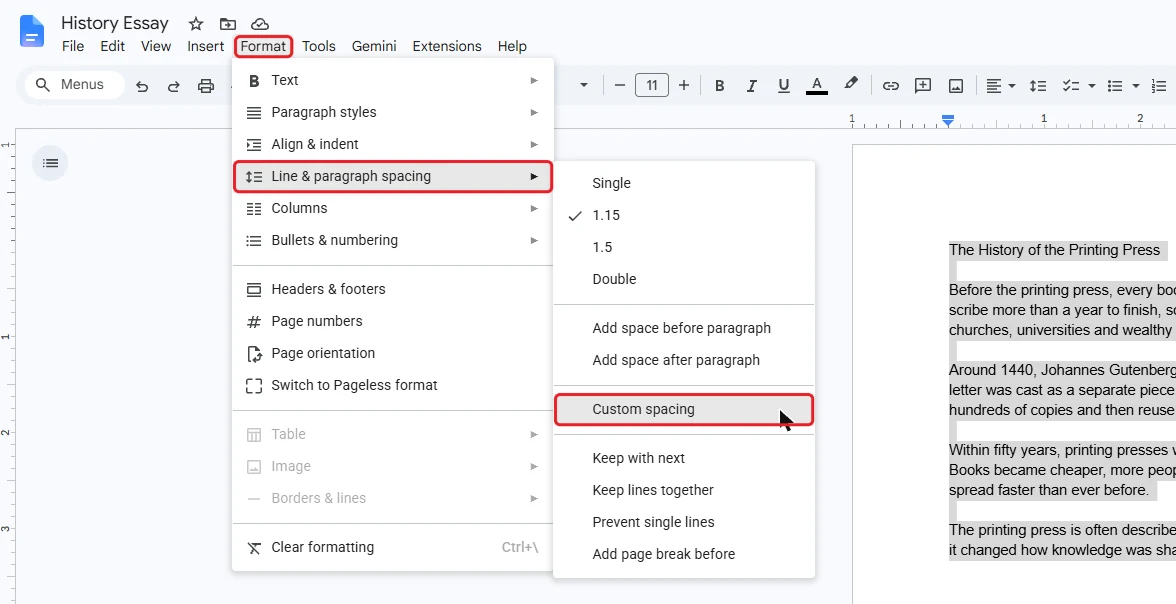
- Type 2 in the Line spacing box.
- Select Apply.

👉 A value of 2 is the same as Double. The same box also sets the space Before and After each paragraph, in points.
Method 4: Make Double Spacing the Default in Google Docs
Do this once if you double space in Google Docs for most of your work. New text in the document, and in your future documents, will start double spaced.
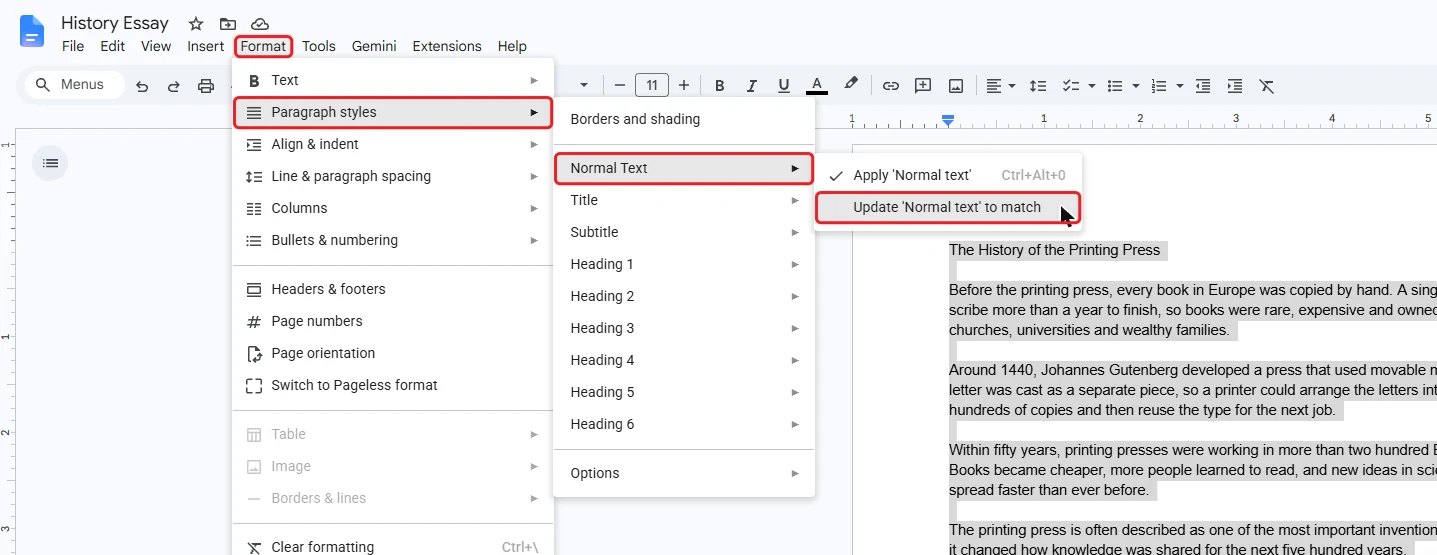
Step 1: Update Normal Text
- Double space one ordinary paragraph using Method 1.
- Click inside that paragraph.
- Select the Format menu at the top, point at Paragraph styles, then Normal text, and select Update ‘Normal text’ to match.
Step 2: Save as Your Default Styles
- Select the Format menu at the top, point at Paragraph styles, then point at Options at the bottom of that list.
- Select Save as my default styles.
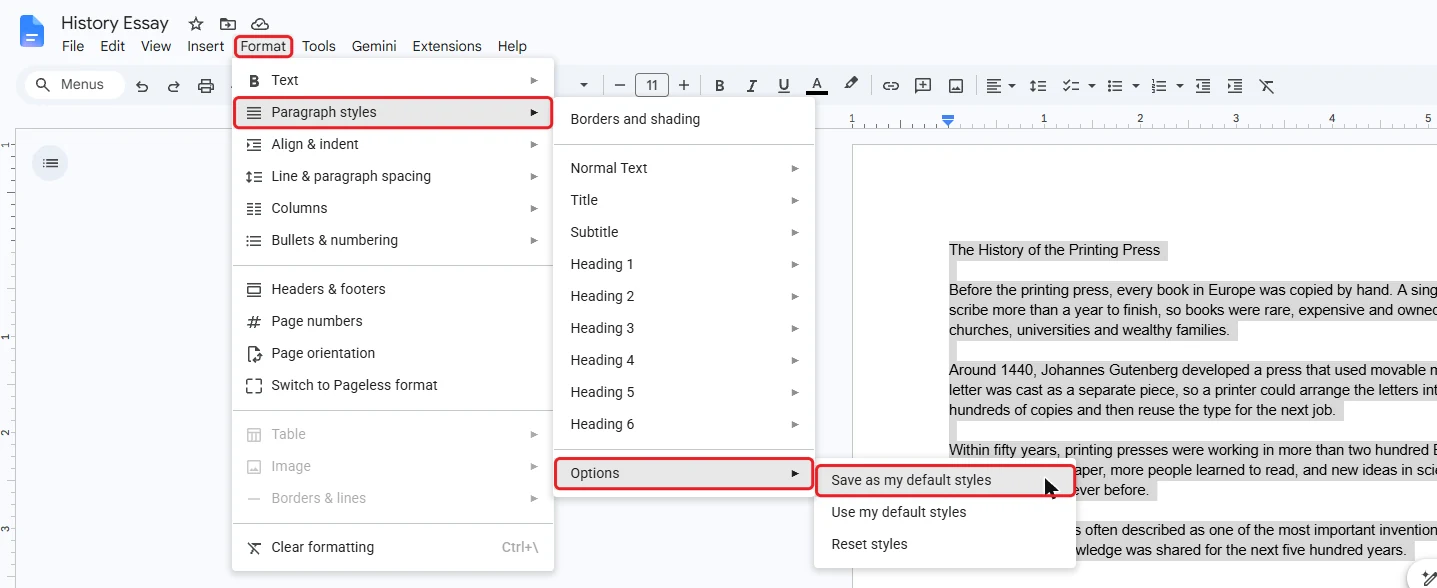
👉 Normal text is now double spaced in this document, and new documents you create will use it too. To undo it, choose Reset styles in the same menu, then save as your default styles again.
Quick Tips
Select Everything First
Before you double space in Google Docs, press Ctrl + A. Line spacing only changes the paragraphs you select.
Space Between Paragraphs
Essays usually need no extra gap between paragraphs. In the spacing menu, choose Remove space after paragraph if one appears.
Essay Formats
MLA and APA ask for double spacing throughout, including the works cited or reference list.
Word Documents
When you open a Word document in Google Docs, its line spacing comes across with the text, so check it before you hand it in.
Common Problems
Only Part of the Document Changed
When you double space in Google Docs, only the selected paragraphs change. Press Ctrl + A and choose Double again.
There Are Big Gaps Between Paragraphs
Paragraph spacing has been added on top of the line spacing. Open Format > Line & paragraph spacing > Custom spacing and set Before and After to 0.
New Documents Are Not Double Spaced
Updating Normal text only changes the current document. Select Format > Paragraph styles > Options > Save as my default styles to use double spacing in new documents.
FAQs
How do I double space in Google Docs?
To double space in Google Docs, select your text with Ctrl + A, click Line & paragraph spacing in the toolbar and choose Double. The change applies straight away.
Is there a keyboard shortcut for double spacing in Google Docs?
No. Google Docs has no built-in shortcut for double spacing, so the toolbar button is the quickest way. Press Ctrl + A first to select the whole document.
How do I double space in the Google Docs app on a phone?
In the Google Docs app on iPhone, iPad or Android, tap Edit, select your text, then tap Format (the A icon) and open Paragraph. Use the arrows next to Line spacing until it shows 2.
Why is only part of my document double spaced?
Line spacing only changes the paragraphs you select. Press Ctrl + A to select everything, then choose Double again.
How do I make double spacing the default in Google Docs?
Double space one paragraph, then select Format > Paragraph styles > Normal text > Update ‘Normal text’ to match. To use it in new documents too, select Format > Paragraph styles > Options > Save as my default styles.
What is the difference between 1.5 and double spacing?
Double spacing makes each line twice the height of single spacing, while 1.5 makes it one and a half times the height. Most essay guidelines that ask for double spacing mean the Double option or a custom value of 2.
Does Google Docs double spacing work for MLA and APA format?
Yes. MLA and APA both ask for double spacing throughout, including the reference list or works cited, so select the whole document before choosing Double.
How do I double space in Microsoft Word instead?
In Word, select your text and press Ctrl + 2, or use the Line and Paragraph Spacing button on the Home tab. See how to do double line spacing in Word for all three methods.
Conclusion
To double space in Google Docs, select your text and choose Double from the Line & paragraph spacing button. Use custom spacing for an exact value, and save Normal text as your default style if every document needs it. Google explains the same settings in its help page on changing how paragraphs look.
Working in Word as well? Learn how to change line spacing in Word, or browse all our Google Docs tutorials.
Related Tutorials
- How To Do Double Line Spacing in Word
- How to Open a Word Document in Google Docs
- How to Set 1.5 Line Spacing in Word
Google Docs Tutorials
Recently Added Google Docs Tutorials
Browse the complete collection for help with formatting, spacing, page setup and opening Word files in Google Docs.
For Google support documentation, visit the official Google Docs Editors Help.
Leave a Reply