Skip to content
Word Made Easy Shop
Home Word Tutorials Word Templates Resources Google Docs PowerPoint Tutorials YouTube Videos
Home Word Tutorials Word Templates Resources Google Docs PowerPoint Tutorials YouTube Videos Shop
Microsoft Word, School and Teacher Forms, Word Templates

School and Teacher Forms

Free Detailed Lesson Plan Templates for Word: Classic and DLP A to J Formats

Preview every template, choose colour or black and white and your paper size, then download your Word templates in one small ZIP file.

Made by a teacherLong bond, A4 and US Letter2 Word templatesFree
Published 20 November 2026 · By Patrick Elliott

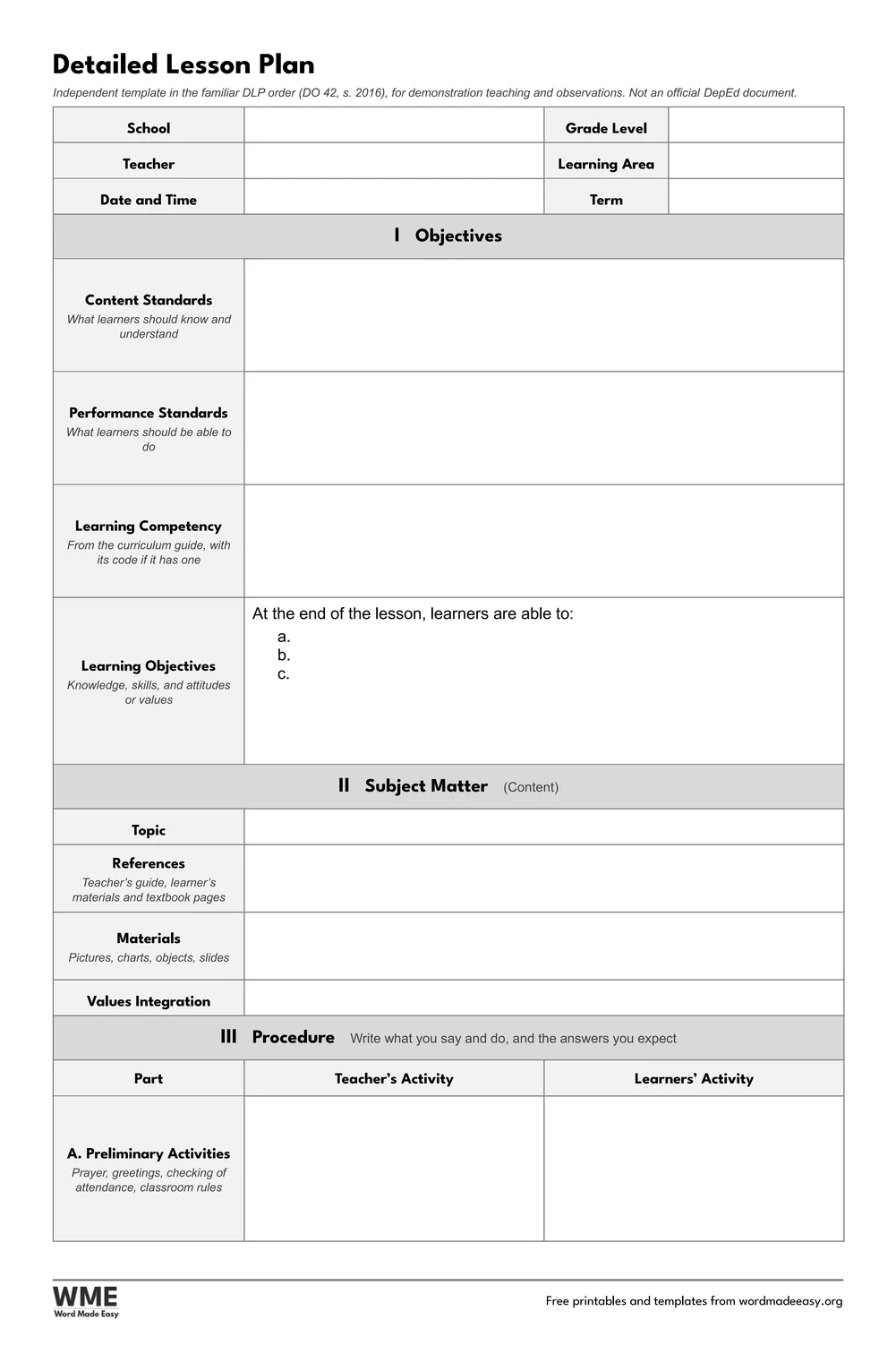
Detailed Lesson Plan. Click to enlarge.
Detailed lesson plan template for Word: DLP Format (A to J), long bond 8.5 x 13 in
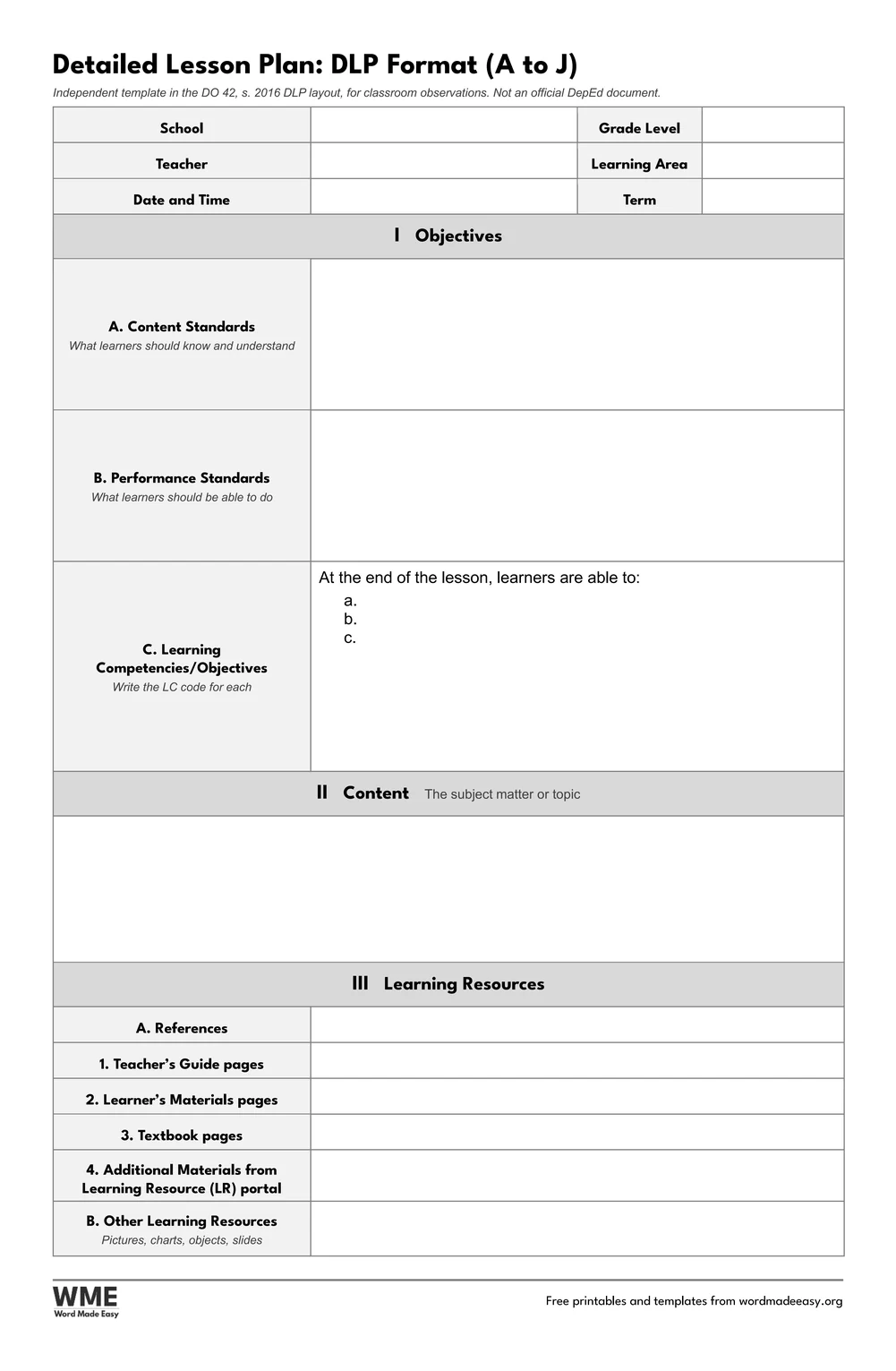
DLP Format (A to J) · 4 pages in the DO 42, s. 2016 DLP layout. Click to enlarge.
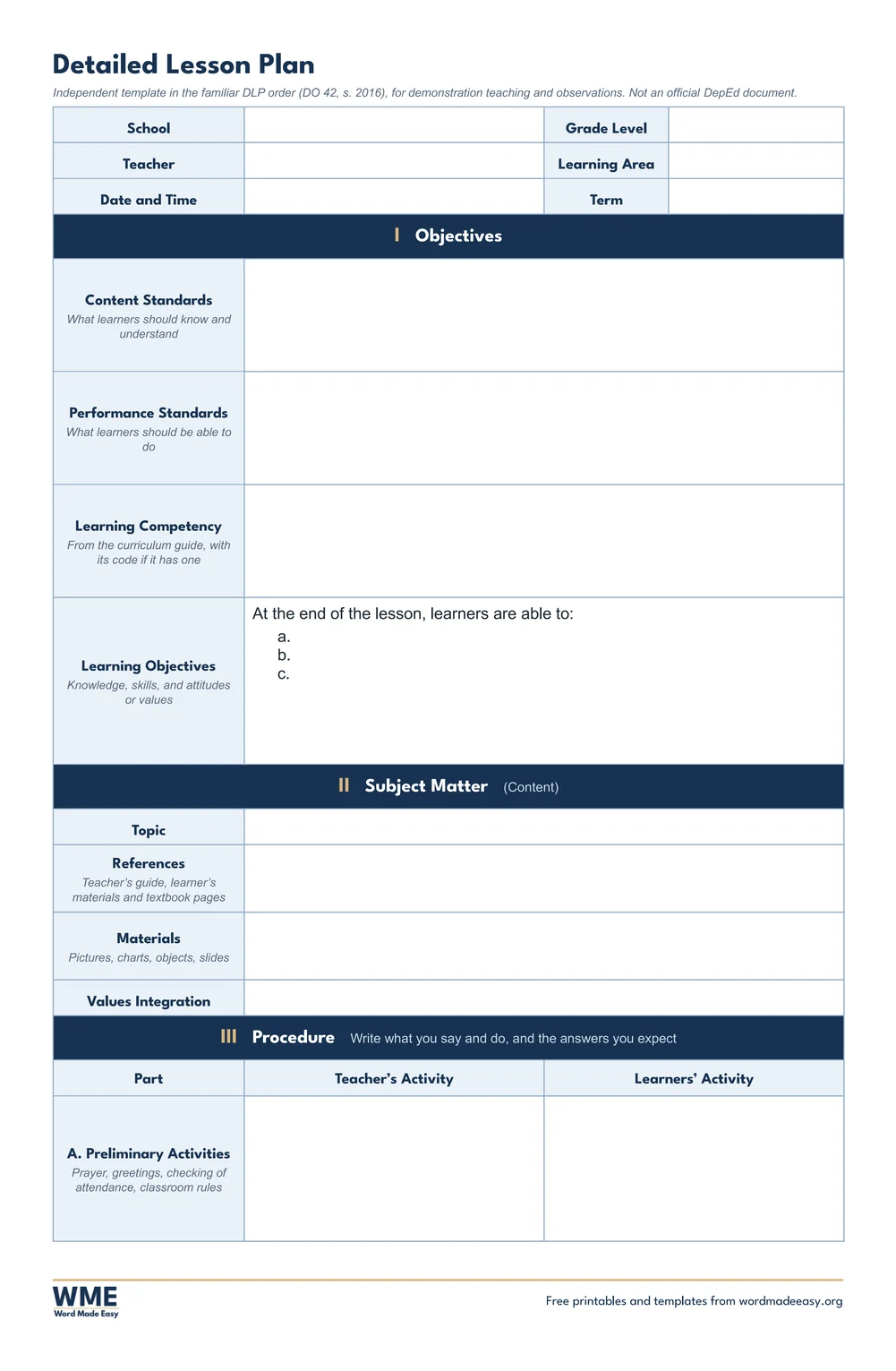
Detailed Lesson Plan, Black and White. Click to enlarge.
Detailed lesson plan template for Word: DLP Format (A to J), black and white, long bond 8.5 x 13 in
DLP Format (A to J), Black and White. Click to enlarge.

More free templates

  • 4As Lesson Plan Template for Word 4As Lesson Plan Template Free Word files
  • Semi-Detailed Lesson Plan Template for Word Semi-Detailed Lesson Plan Template Free Word files
  • Class Record Template for Word Class Record Template 5 Word files
  • Learner’s Profile Templates for Word Learner’s Profile Templates 5 Word files
  • LAC Templates for Word LAC Templates 5 Word files
  • PMES Portfolio Templates for Word PMES Portfolio Templates 6 Word files
  • Narrative Report and Accomplishment Report Templates for Word Narrative Report and Accomplishment Report Templates 8 Word files
  • Moving-Up and Perfect Attendance Certificates for Word Moving-Up and Perfect Attendance Certificates 5 Word files

Download your free Word templates

Enter your email address to download. We will also send you new free templates and printables now and then, unless you choose to just download.

Choose colour or black and white
Choose your paper size

I agree that Word Made Easy may email me a weekly newsletter with new free templates, printables and Word tips, and occasional offers of paid templates. I can unsubscribe at any time. Choose "No thanks, just download" if you do not want these emails.

Read the Privacy Policy for details about storage, retention and your rights.

Can’t find the template you need? Request a template and I’ll make it in Word, free.

Get new free printables first: follow Word Made Easy on Pinterest

These free detailed lesson plan templates give you two Word formats: the classic detailed plan, where every part of the procedure has a Teacher’s Activity column and a Learners’ Activity column, and a DLP format that follows the A to J procedure of DO 42, s. 2016, for classroom observations. Please note that DepEd public schools now plan with ILAW under DO 16, s. 2026, so for your required school plan use our ILAW lesson plan templates. The detailed plan is still what colleges, demonstration teaching, observations and many private schools ask for. Both formats follow the parts and order teachers know from teacher-education guides and the DO 42, s. 2016 annexes, checked against two published copies of the annex.

Below, you’ll find what each part of a detailed plan is for, how it differs from a semi-detailed plan, and how to write a teacher-and-learner script that an observer can follow line by line.


Contents hide
1 What’s in the Detailed Lesson Plan Templates
2 What Is a Detailed Lesson Plan?
3 Which Detailed Lesson Plan Format Should You Use?
4 How to Write a Detailed Lesson Plan
5 Black and White Versions
6 How to Print the Detailed Lesson Plan
7 FAQs
8 Conclusion
9 Related Tutorials
10 Word Templates

What’s in the Detailed Lesson Plan Templates

TemplateWhat it holds
Detailed Lesson Plan3 pages: objectives, subject matter, then Teacher’s Activity and Learners’ Activity columns from preliminaries to application
DLP Format (A to J)4 pages in the DO 42, s. 2016 DLP layout: learning resources, procedures A to J and reflection A to G, for observations
Papers and stylesEvery plan on long bond (8.5 x 13 in), A4 and US Letter, in colour and in black and white
Detailed lesson plan template for Word on long bond: header fields, Objectives, Subject Matter and the start of the Procedure with Teacher’s Activity and Learners’ Activity columns

👉 Every box is a Word table cell with a click-and-type box, and the writing rows grow as you type, so a long discussion simply pushes the next part down the page.


What Is a Detailed Lesson Plan?

A detailed lesson plan writes out the whole lesson before you teach it: the objectives, the subject matter, and then every step of the procedure as a two-column script. In the left column you write what you will say and do; in the right column you write the answers and actions you expect from the learners. That is why student teachers and teachers preparing a demonstration lesson use it: a supervisor can see exactly how the lesson should unfold, question by question. The classic format runs from preliminary activities (prayer, greetings, checking of attendance) through review, motivation, presentation and discussion to generalization and application, then evaluation and assignment. Need a shorter plan with no script? See the semi-detailed lesson plan template. These are independent templates from Word Made Easy, with no DepEd seal.


Which Detailed Lesson Plan Format Should You Use?

  • Detailed Lesson Plan: three pages. Page 1 holds the header, the four objective rows (content standards, performance standards, learning competency and learning objectives) and the subject matter; pages 2 and 3 hold the procedure in Teacher’s Activity and Learners’ Activity columns, then evaluation, assignment, remarks, reflection and the sign-off.
  • DLP Format (A to J): four pages in the layout of DO 42, s. 2016: learning resources with TG, LM and textbook pages, procedures A (reviewing the previous lesson) to J (additional activities), remarks, and reflection A to G, from learners who earned 80% to innovations you want to share. Use it when an observer asks for the old DLP layout.
  • Planning with the 4As instead? The 4As lesson plan template sets out Activity, Analysis, Abstraction and Application with a minutes column.

How to Write a Detailed Lesson Plan

  1. Choose long bond, A4 or US Letter above, download the ZIP and fill in the school, grade level, teacher, learning area, date and term.
  2. Copy the learning competency, with its code if it has one, from the curriculum guide, then finish the stem with two or three objectives.
  3. List the topic, references and materials, and the value you will integrate.
  4. Script each part: your exact question or instruction on the left, the answers you expect on the right.
  5. Add the evaluation items and the assignment, then ask your cooperating teacher or school head to check and sign the plan.
  6. Don’t want our footer? Open the Word file and double-click the footer at the bottom of the page. Click the logo and press Delete, then do the same with the thin line above it. For the web address, click the edge of its box rather than the words, and press Delete. Double-click the page to finish. This only works in the Word file, not in a PDF.

Writing the script: keep each Teacher’s Activity line short enough to say aloud, and write at least one correct and one partly correct learner answer, so you know how you will respond. Put the key question of the lesson in the discussion, and make the generalization something learners say, not you. If your observer uses a COT rubric, the DLP format’s parts B (purpose), F (developing mastery) and G (practical applications) are where most indicators are seen. Teachers who also need the ILAW parts can map them simply: objectives and competency go under Intentions, the procedure under Learning Experience, evaluation under Assessing Learning, and the assignment and reflection under Ways Forward.


Black and White Versions

Every template on this page also comes in a black and white version with the same layout: grey headings and an outlined title, so it prints clearly on any printer and saves ink. In the download box, choose Colour, Black and white or All, then your paper size: long bond, A4, US Letter or all three.


How to Print the Detailed Lesson Plan

Want to print without editing? Every download has three folders: the editable Word files, the same sheets as PDFs, and every page as a print-ready image (JPEG), so you can print straight away without opening Word.

Print at 100% (Actual size) on the same paper as the file. For long bond, load 8.5 x 13 inch paper and choose that size in the printer settings (it may be called Folio or Long). Print back to back to keep the plan on two sheets, and staple the pages in order before you hand them to your observer.


FAQs

Is this detailed lesson plan template free?

Yes. Choose long bond, A4 or US Letter, colour or black and white, and download both formats in one ZIP file at no cost.

Is the detailed lesson plan still the DepEd format?

No. DepEd public schools now use ILAW under DO 16, s. 2026, which repealed DO 42, s. 2016. Detailed plans are still used in teacher education, demonstration teaching, observations and many private schools.

What is the difference between a detailed and a semi-detailed lesson plan?

A detailed plan scripts every step in Teacher’s Activity and Learners’ Activity columns. A semi-detailed plan lists the same steps as a short outline, without the expected answers.

What are the parts of a detailed lesson plan?

Objectives, subject matter, procedure (preliminary activities, review, motivation, presentation, discussion, generalization and application), evaluation and assignment, with remarks, reflection and a sign-off.

What is the DLP format A to J?

It is the procedure order from DO 42, s. 2016: A reviewing the previous lesson, through C presenting examples, D and E discussing new concepts, F developing mastery and I evaluating learning, to J additional activities.

Is there a black and white version?

Yes. Both formats come in colour and in black and white, on long bond, A4 and US Letter. Choose Black and white, or All, in the download box.


Conclusion

Two detailed lesson plan formats, the classic teacher-and-learner script and the DLP layout with procedures A to J, ready for demonstration teaching and observations and editable in Microsoft Word.

Choose your paper size above and download the ZIP. For the plan DepEd public schools use now, see the ilaw lesson plan templates; for a shorter outline, try the semi-detailed lesson plan template.


Related Tutorials

  • Free ILAW Lesson Plan Templates for Word
  • Free Semi-Detailed Lesson Plan Template for Word
  • Free 4As Lesson Plan Template for Word

Word Templates

Recently Added Word Templates

  • Free 4As Lesson Plan Template for Word: Editable Format with Time Column

    November 20, 2026
  • Free Semi-Detailed Lesson Plan Template for Word: Editable Outline Format

    November 20, 2026
  • Christmas Writing Paper Templates for Word: 6 Free Border Designs

    November 19, 2026

Browse the complete collection of free printable Word templates for home and school, all made by a teacher.

View all Word templates
Watch on YouTube

New to Word? Our Word tutorials show you how to edit and print your templates.
← PreviousNumber Cross Puzzles: 10 Free Printables with Sum Boxes and Answers
Next →Free Semi-Detailed Lesson Plan Template for Word: Editable Outline Format

Leave a comment Cancel reply

Have a question about these templates, or an idea for a new one? Ask below.

Meet the Author

Patrick Elliott standing outdoors holding his dog.

I’m Patrick Elliott, the creator of Word Made Easy. I’ve worked in schools for over 10 years and I’m now an Inclusion Lead in the UAE. I use Microsoft Word and PowerPoint every day for planning, documentation and classroom resources.

Every guide is tested step by step before publishing (usually in Microsoft 365), and every free template is one I made myself in Word. You’ll also find practical walkthroughs on my YouTube channel.

Browse

  • Word TutorialsStep-by-step guides for every feature
  • Word Beginners HubFree 12-chapter Word course
  • Word TemplatesFree, editable downloads
  • ResourcesWorksheets, posters and puzzles
  • Word Shortcut Cheat SheetsFree printable PDFs
  • Google Docs TutorialsStep-by-step Docs guides
  • PowerPoint TutorialsClear, simple slide guides
  • YouTube VideosWatch the video walkthroughs

Watch on YouTube

Prefer to watch? Most guides have a short video walkthrough on the Word Made Easy channel.

  • 147videos
  • 1.88Mviews
  • 8,000+subscribers
Subscribe on YouTube

Lesson Plan Templates

This set is part of the Lesson Plan Templates collection, with every related set side by side on one page.

See the collection →

In this section: School and Teacher Forms

  • Free 4As Lesson Plan Template for Word: Editable Format with Time ColumnNovember 20, 2026
  • Free Semi-Detailed Lesson Plan Template for Word: Editable Outline FormatNovember 20, 2026
  • Free Class Record Template for Word (DO 15, s. 2026): 5 PrintablesNovember 12, 2026
  • Free Learner’s Profile Templates for Word: 5 PrintablesNovember 12, 2026
  • Free LAC Templates for Word (DO 35, s. 2016): 5 PrintablesNovember 12, 2026

See all →

Recently Added Word Templates

  • Free 4As Lesson Plan Template for Word: Editable Format with Time ColumnNovember 20, 2026
  • Free Semi-Detailed Lesson Plan Template for Word: Editable Outline FormatNovember 20, 2026
  • Christmas Writing Paper Templates for Word: 6 Free Border DesignsNovember 19, 2026
  • January 2027 Calendar for Word: 6 Free Printable DesignsNovember 18, 2026
  • December 2026 Calendar for Word: 4 Free Printable DesignsNovember 17, 2026

See all →

Most Downloaded

  • Free Microsoft Word Keyboard Shortcuts Bundle: 14 Cheat Sheets (PDF)78 downloads in the last 30 days
  • Microsoft Word for Beginners: Free Guide and PDF76 downloads in the last 30 days
  • Free ILAW Lesson Plan Templates for Word: English and Filipino (DO 16, s. 2026)67 downloads in the last 30 days
  • Free Fillable Form Templates for Word: 4 Easy Forms63 downloads in the last 30 days
  • Free Printable Alphabet Charts for Word: 5 Easy Designs52 downloads in the last 30 days

About

  • About Me
  • Contact
  • Shop

Microsoft Word

  • All Word Tutorials
  • Page Layout & Sections
  • Tables, Images & Media
  • Formatting Basics
  • Productivity & Automation
  • Beginners Hub
  • Shortcut Cheat Sheets

Word Templates

  • Business
  • Calendars and Planners
  • Home, Health and Money
  • School and Teacher Forms
  • Cards, Invitations and Labels
  • Paper and Grids
  • Holidays and Seasonal

Resources

  • Phonics and Reading
  • Handwriting
  • Writing
  • Maths
  • Puzzles and Activities
  • Classroom Display
  • Study Packs
  • Seasonal
  • Collections

More Tutorials

  • Google Docs Tutorials
  • PowerPoint Tutorials
  • YouTube Videos

Follow Us

  • YouTube
  • Facebook
  • Pinterest
Privacy Policy Cookie Policy Terms of Use
© 2012–2026 Word Made Easy. All rights reserved.
Manage your privacy

To provide the best experiences, we and our partners use technologies like cookies to store and/or access device information. Consenting to these technologies will allow us and our partners to process personal data such as browsing behavior or unique IDs on this site and show (non-) personalized ads. Not consenting or withdrawing consent, may adversely affect certain features and functions.

Click below to consent to the above or make granular choices. Your choices will be applied to this site only. You can change your settings at any time, including withdrawing your consent, by using the toggles on the Cookie Policy, or by clicking on the manage consent button at the bottom of the screen.

Functional Always active
The technical storage or access is strictly necessary for the legitimate purpose of enabling the use of a specific service explicitly requested by the subscriber or user, or for the sole purpose of carrying out the transmission of a communication over an electronic communications network.
Preferences
The technical storage or access is necessary for the legitimate purpose of storing preferences that are not requested by the subscriber or user.
Statistics
The technical storage or access that is used exclusively for statistical purposes. The technical storage or access that is used exclusively for anonymous statistical purposes. Without a subpoena, voluntary compliance on the part of your Internet Service Provider, or additional records from a third party, information stored or retrieved for this purpose alone cannot usually be used to identify you.
Marketing
The technical storage or access is required to create user profiles to send advertising, or to track the user on a website or across several websites for similar marketing purposes.
Statistics

Marketing

Features
Always active

Special features

Special purposes
Always active

  • Manage options
  • Manage services
  • Manage {vendor_count} vendors
  • Read more about these purposes
Manage options
  • {title}
  • {title}
  • {title}
Manage your privacy
To provide the best experiences, we use technologies like cookies to store and/or access device information. Consenting to these technologies will allow us to process data such as browsing behavior or unique IDs on this site. Not consenting or withdrawing consent, may adversely affect certain features and functions.
Functional Always active
The technical storage or access is strictly necessary for the legitimate purpose of enabling the use of a specific service explicitly requested by the subscriber or user, or for the sole purpose of carrying out the transmission of a communication over an electronic communications network.
Preferences
The technical storage or access is necessary for the legitimate purpose of storing preferences that are not requested by the subscriber or user.
Statistics
The technical storage or access that is used exclusively for statistical purposes. The technical storage or access that is used exclusively for anonymous statistical purposes. Without a subpoena, voluntary compliance on the part of your Internet Service Provider, or additional records from a third party, information stored or retrieved for this purpose alone cannot usually be used to identify you.
Marketing
The technical storage or access is required to create user profiles to send advertising, or to track the user on a website or across several websites for similar marketing purposes.
Statistics

Marketing

Features
Always active

Special features

Special purposes
Always active

  • Manage options
  • Manage services
  • Manage {vendor_count} vendors
  • Read more about these purposes
Manage options
  • {title}
  • {title}
  • {title}