Skip to content
Word Made Easy
Home Word Tutorials Word Templates Google Docs PowerPoint Tutorials YouTube Videos
Classroom, Microsoft Word, Word Templates

Word Templates

Free Class Newsletter Templates for Word: 5 Editable Designs

Preview every template, choose colour or black and white and your paper size, then download your Word templates in one small ZIP file.

Made by a teacherA4 and US Letter20 Word documentsFree
Updated 13 November 2026 · By Patrick Elliott

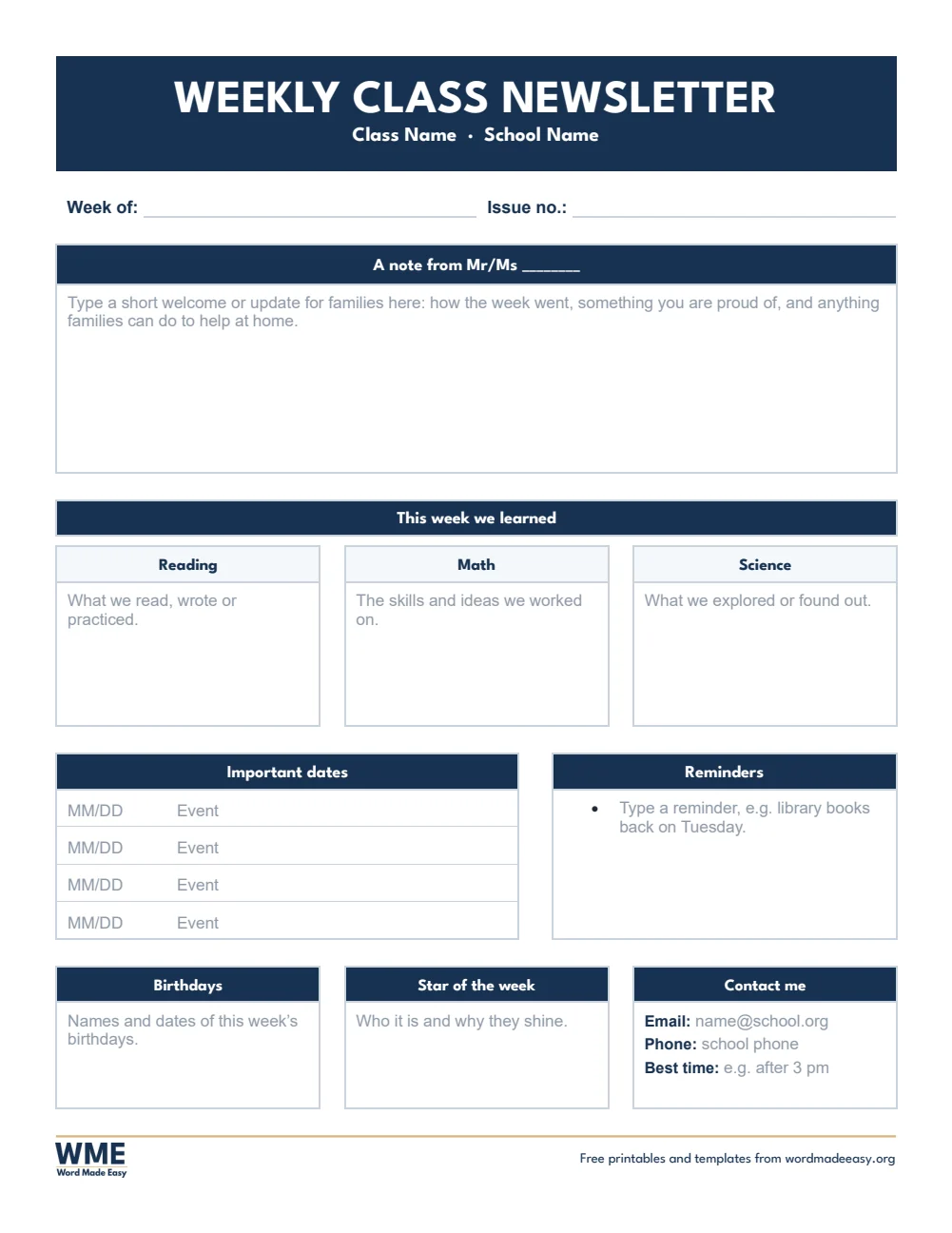
Weekly class newsletter template for Word: a note from the teacher, this week’s learning in reading, math and science, dates, reminders and contact details on US Letter
Weekly Class Newsletter · A note to families, this week’s learning by subject, dates, reminders, birthdays, star of the week and contact details. Click to enlarge.
Class newsletter template for Word: Class Newsletter Template, Monday to Friday Class Newsletter, US Letter
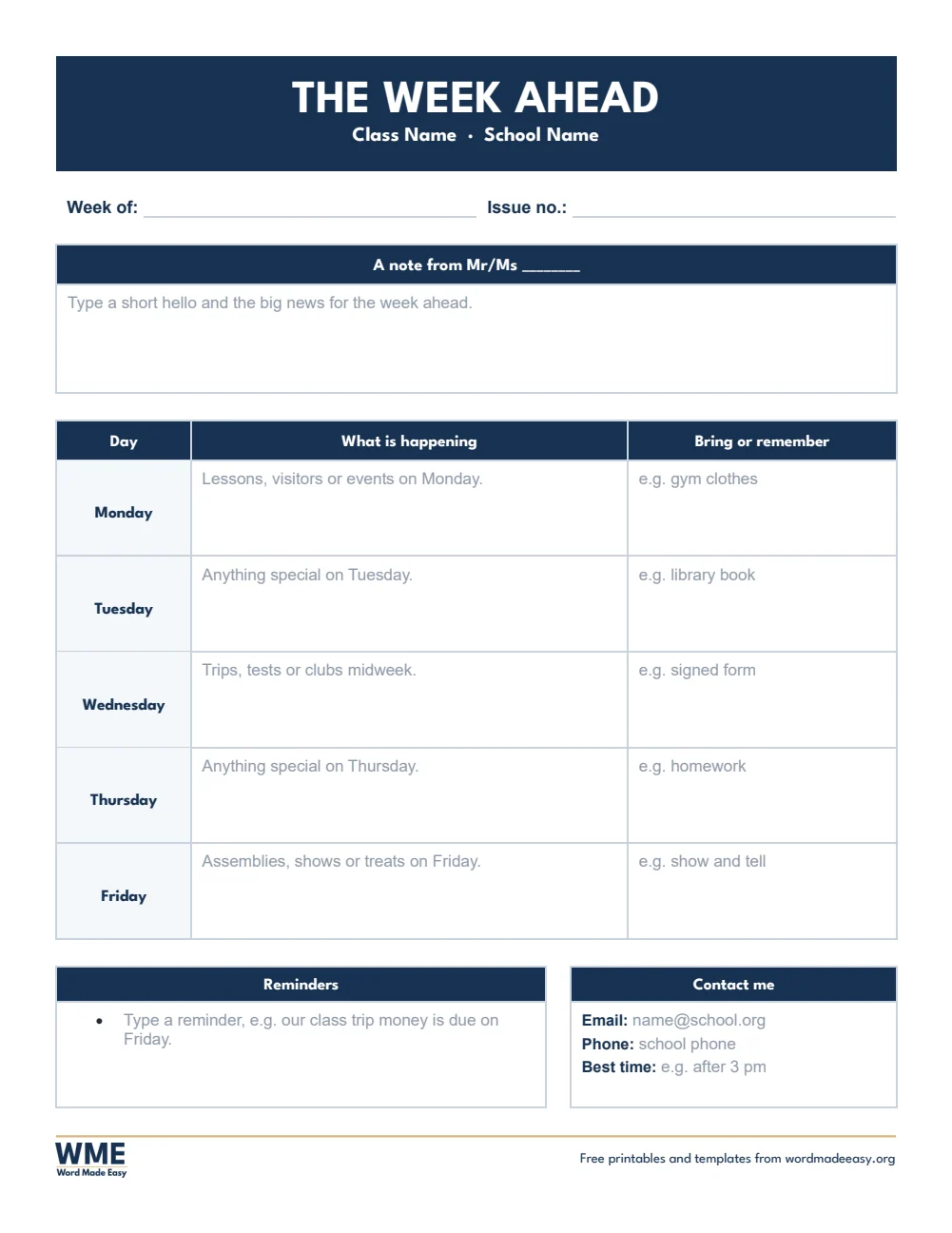
Monday to Friday Class Newsletter · A short note, then what is happening and what to bring each day, Monday to Friday, with reminders and contact details. Click to enlarge.
Class newsletter template for Word: Class Newsletter Template, Monthly Class Newsletter, US Letter
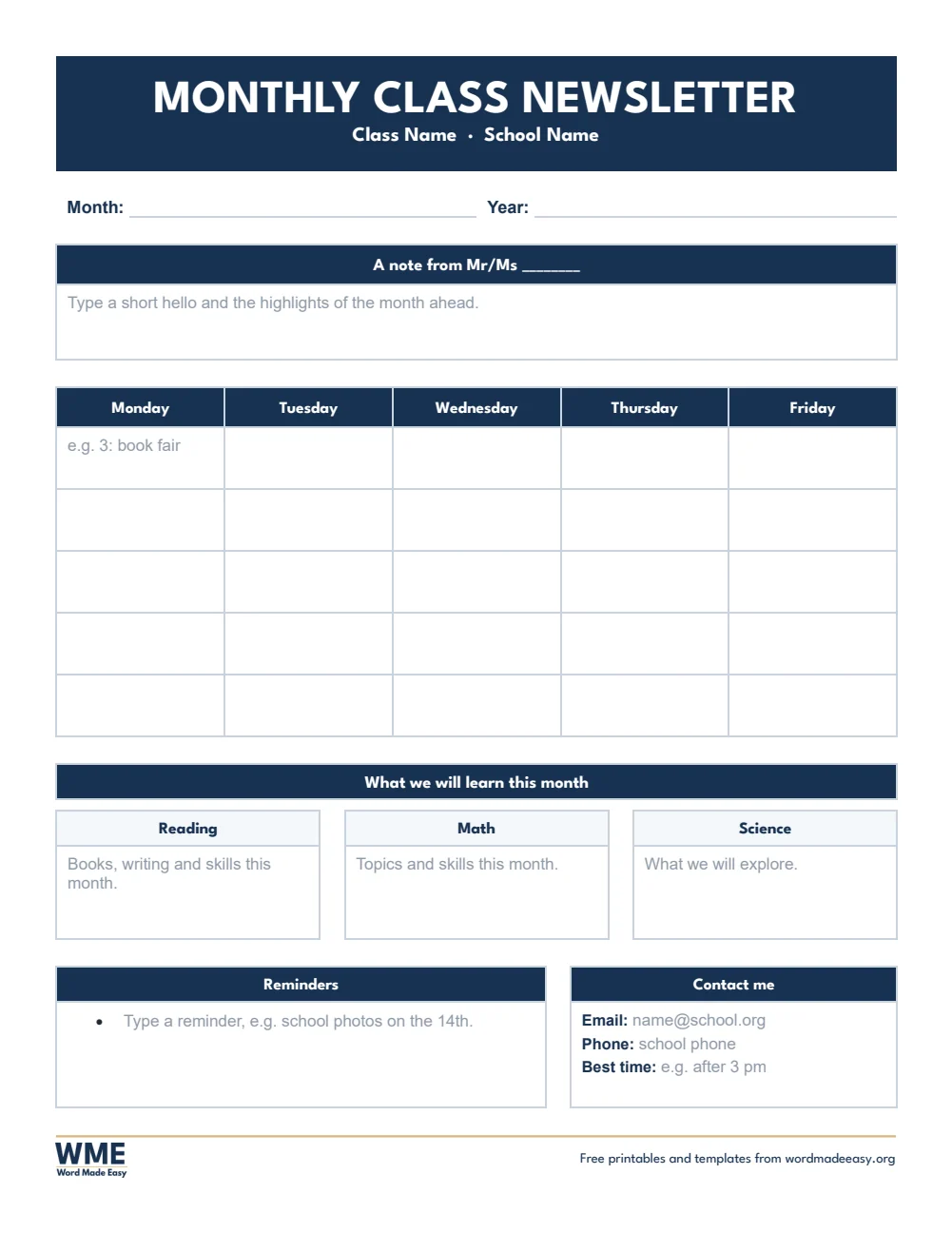
Monthly Class Newsletter · A note, a Monday to Friday month calendar to type into, the month’s learning by subject, reminders and contact details. Click to enlarge.
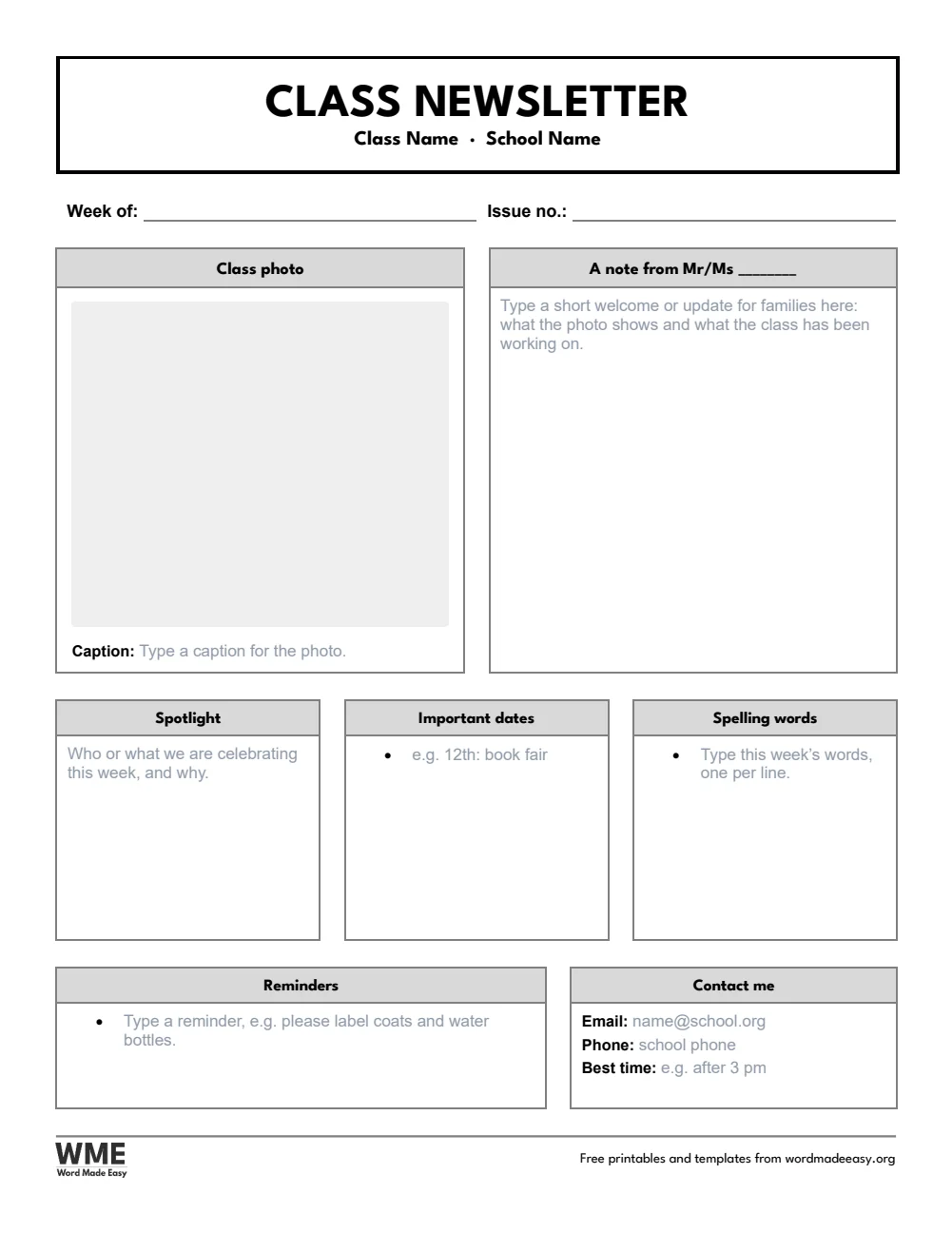
Class newsletter template for Word: Class Newsletter Template, Class Newsletter with Photo, US Letter
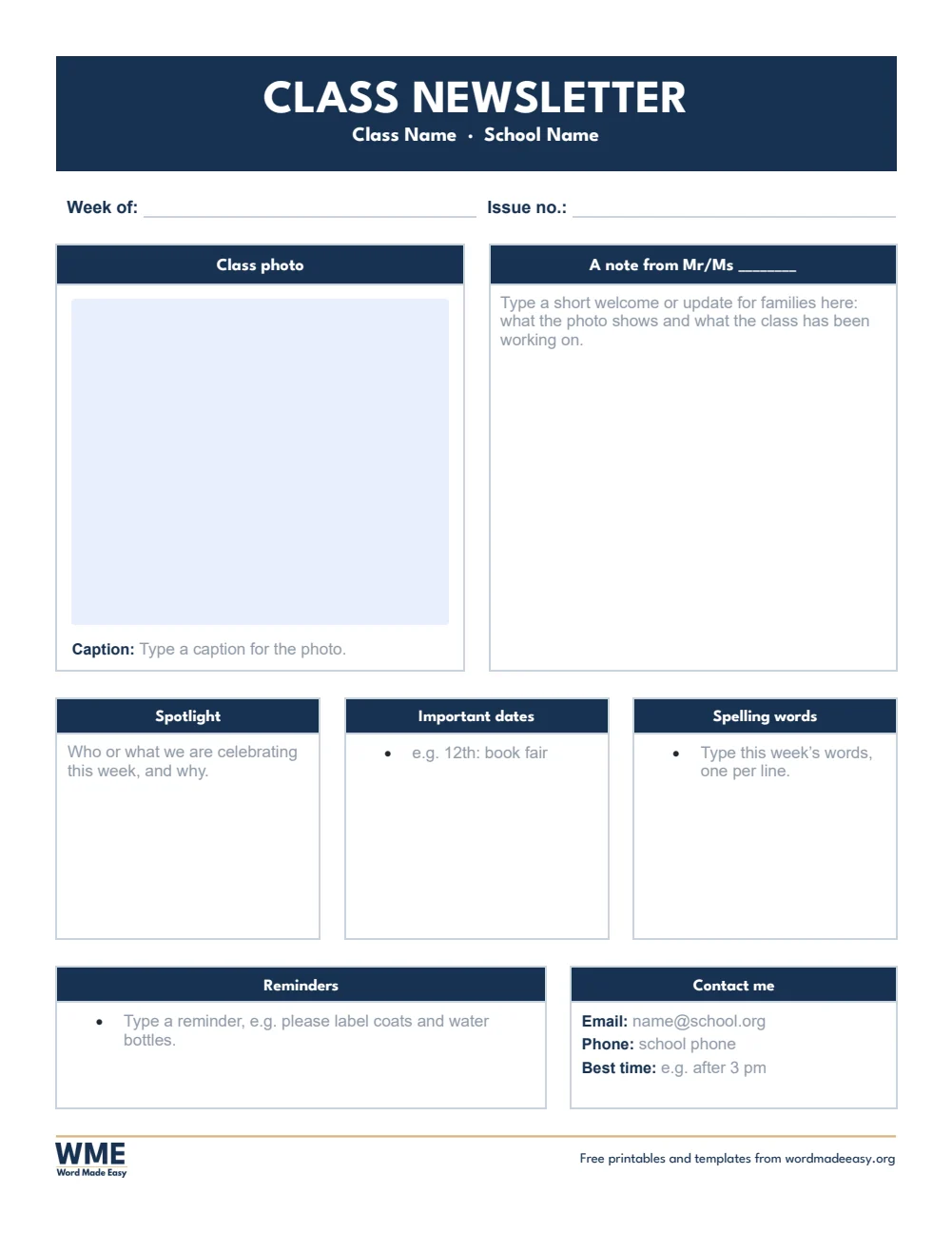
Class Newsletter with Photo · A class photo with a caption beside the teacher’s note, then spotlight, dates, spellings, reminders and contact details. Click to enlarge.
Class newsletter template for Word: Class Newsletter Template, Simple Class Newsletter, US Letter
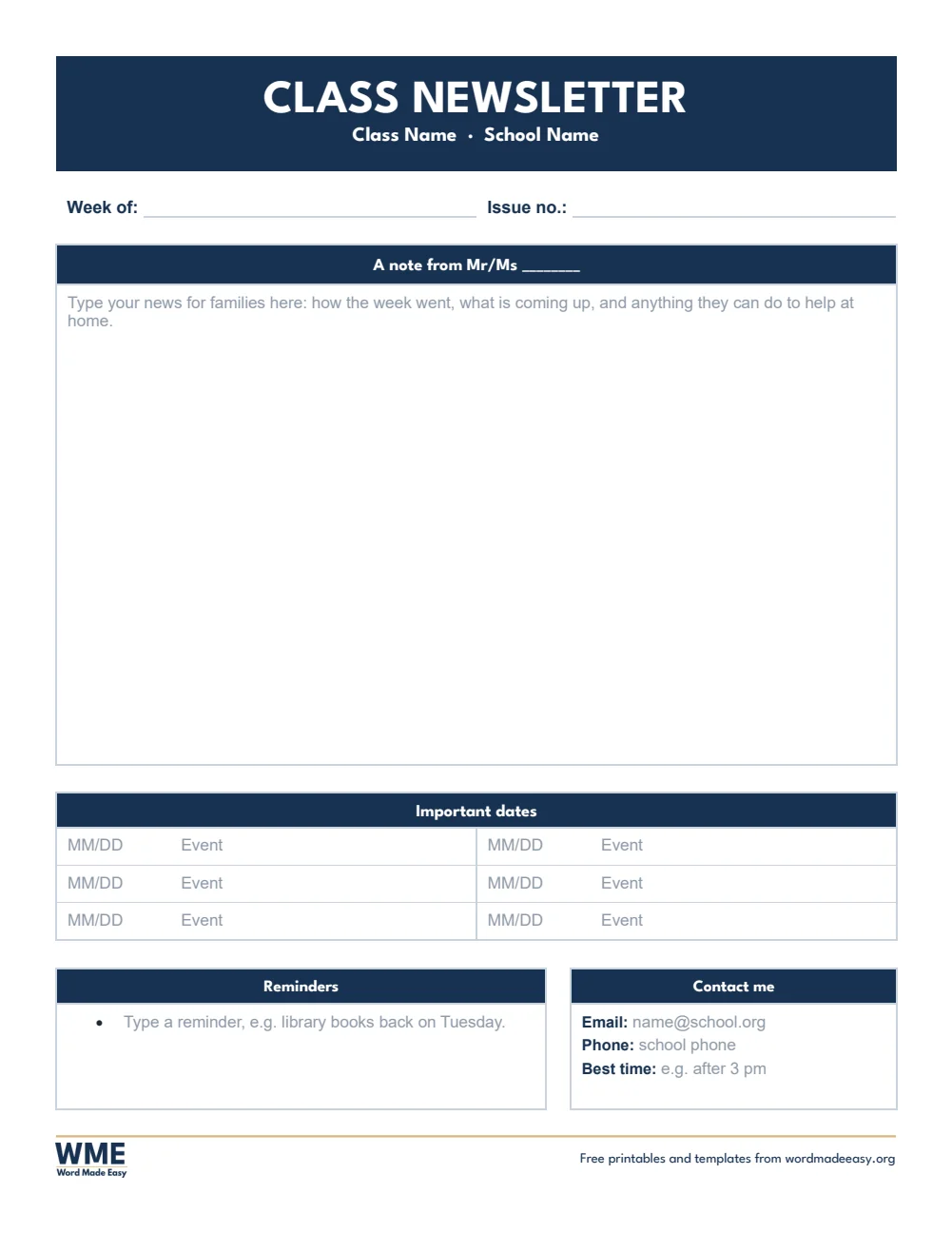
Simple Class Newsletter · One large note to families, a short list of dates, reminders and contact details: the quickest to fill in. Click to enlarge.
Class newsletter template for Word: Class Newsletter Template, Weekly Class Newsletter, US Letter, US Letter
Weekly Class Newsletter, Black and White · A note to families, this week’s learning by subject, dates, reminders, birthdays, star of the week and contact details. Click to enlarge.
Class newsletter template for Word: Class Newsletter Template, Monday to Friday Class Newsletter, US Letter, US Letter
Monday to Friday Class Newsletter, Black and White · A short note, then what is happening and what to bring each day, Monday to Friday, with reminders and contact details. Click to enlarge.
Class newsletter template for Word: Class Newsletter Template, Monthly Class Newsletter, US Letter, US Letter
Monthly Class Newsletter, Black and White · A note, a Monday to Friday month calendar to type into, the month’s learning by subject, reminders and contact details. Click to enlarge.
Class newsletter template for Word: Class Newsletter Template, Class Newsletter with Photo, US Letter, US Letter
Class Newsletter with Photo, Black and White · A class photo with a caption beside the teacher’s note, then spotlight, dates, spellings, reminders and contact details. Click to enlarge.
Class newsletter template for Word: Class Newsletter Template, Simple Class Newsletter, US Letter, US Letter
Simple Class Newsletter, Black and White · One large note to families, a short list of dates, reminders and contact details: the quickest to fill in. Click to enlarge.

More free templates

  • Alphabet Worksheets: 5 Free Printables for Preschool and Kindergarten for Word Alphabet Worksheets: 5 Free Printables for Preschool and Kindergarten 5 Word files
  • Class Record Template for Word Class Record Template 5 Word files
  • Learner’s Profile Templates for Word Learner’s Profile Templates 5 Word files
  • LAC Templates for Word LAC Templates 5 Word files
  • Classroom Structuring Templates for Word Classroom Structuring Templates Free Word files
  • PMES Portfolio Templates for Word PMES Portfolio Templates 6 Word files
  • Printable Mazes for Kids: 30 Mazes with Answer Keys for Word Printable Mazes for Kids: 30 Mazes with Answer Keys Free Word files
  • Narrative Report and Accomplishment Report Templates for Word Narrative Report and Accomplishment Report Templates 8 Word files

Download your free Word templates

Enter your email address to download. We will also send you new free Word templates now and then, unless you choose to just download.

Choose colour or black and white
Choose your paper size

I agree that Word Made Easy may email me occasional updates about new Word Templates. I can unsubscribe at any time. Choose "No thanks, just download" if you do not want these emails.

Read the Privacy Policy for details about storage, retention and your rights.

Can’t find the template you need? Request a template and I’ll make it in Word, free.

Get new free printables first: follow Word Made Easy on Pinterest

These free class newsletter templates give you 5 designs as Word documents on US Letter and A4: a weekly class newsletter, a Monday to Friday newsletter, a monthly newsletter with a calendar, a class newsletter with a photo and a simple newsletter, each in colour and in black and white. I’m Patrick Elliott, a teacher and Inclusion Lead. As a teacher I send a newsletter home every week, so each one here puts what parents read first at the top: your note, then the dates.

In this guide, you’ll find which newsletter suits your week, what parents most want to read, and how to fill one in Word in about ten minutes.


Contents hide
1 What’s in the Class Newsletter Templates
2 What Goes in a Class Newsletter for Parents?
3 Which Class Newsletter Should You Use?
4 How to Make a Class Newsletter in Word
5 How to Print or Send Your Newsletter
6 FAQs
7 Conclusion
8 Related Tutorials
9 Word Templates

What’s in the Class Newsletter Templates

PaperTemplateWhat’s inside
US LetterWeekly Class NewsletterA note to families, this week’s learning by subject, dates, reminders, birthdays, star of the week and contact details
US LetterMonday to Friday Class NewsletterA short note, then what is happening and what to bring each day, Monday to Friday, with reminders and contact details
US LetterMonthly Class NewsletterA note, a Monday to Friday month calendar to type into, the month’s learning by subject, reminders and contact details
US LetterClass Newsletter with PhotoA class photo with a caption beside the teacher’s note, then spotlight, dates, spellings, reminders and contact details
US LetterSimple Class NewsletterOne large note to families, a short list of dates, reminders and contact details: the quickest to fill in
A4Weekly Class NewsletterA note to families, this week’s learning by subject, dates, reminders, birthdays, star of the week and contact details
A4Monday to Friday Class NewsletterA short note, then what is happening and what to bring each day, Monday to Friday, with reminders and contact details
A4Monthly Class NewsletterA note, a Monday to Friday month calendar to type into, the month’s learning by subject, reminders and contact details
A4Class Newsletter with PhotoA class photo with a caption beside the teacher’s note, then spotlight, dates, spellings, reminders and contact details
A4Simple Class NewsletterOne large note to families, a short list of dates, reminders and contact details: the quickest to fill in
Weekly class newsletter template for Word: a note from the teacher, this week’s learning in reading, math and science, dates, reminders and contact details on US Letter

👉 Every heading is fixed and every box holds a grey prompt: click it and type, and your words replace the prompt in dark text.


What Goes in a Class Newsletter for Parents?

A class newsletter is a short letter home from the teacher that tells families what is happening in class and what they need to do. Parents read the first lines and the dates most, so open with a friendly note, then say what the class is learning this week, list the key dates and reminders, and finish with how to contact you. Keep it to one page, use plain words, and send it on the same day each week or month so families know when to look for it. A pupil-written class newspaper is a different thing: for that, use the newspaper templates linked below.


Which Class Newsletter Should You Use?

  • Weekly class newsletter: a note to families, this week’s learning by subject, dates, reminders, birthdays, star of the week and your contact details.
  • Monday to Friday class newsletter: a short note, then what is happening and what to bring on each day of the week ahead.
  • Monthly class newsletter: a note, a Monday to Friday calendar for the month to type into, the month’s learning, reminders and contact details.
  • Class newsletter with photo: paste a class photo beside your note, add a caption, then a spotlight, dates, spelling words and reminders.
  • Simple class newsletter: one large note, a short list of dates, reminders and contact details: the quickest to fill in.
  • Black and white versions: every template also comes in a printer-friendly black and white version with grey headings, to save ink.

How to Make a Class Newsletter in Word

  1. Choose your template and paper size above, download the ZIP and open the newsletter in Word.
  2. Click the grey prompt in the title bar and type your class and school name, then the week or month.
  3. Click each grey prompt below and type your news. Delete the prompts you do not need: an empty box prints blank.
  4. For the photo newsletter, click the picture box and choose a photo; it fits the frame by itself.
  5. Save a copy with the date in the file name, then print at 100% or save it as a PDF to email home.

Write the newsletter once, then reuse it: open last week’s copy, save it under a new date and change only what is new. Check you have permission before you share photos of children. The A4 versions use UK wording, such as English, Maths and Topic.


How to Print or Send Your Newsletter

Print at 100% (Actual size) on the same paper as the file, US Letter or A4. To send it by email, choose File > Save As > PDF in Word. The black and white versions use grey headings, so they print clearly and save ink.


FAQs

Are these class newsletter templates free?

Yes. Choose US Letter or A4, colour or black and white, and download all five newsletters in one ZIP file at no cost.

Who made these class newsletter templates?

Patrick Elliott, a teacher and Inclusion Lead, designed and built every class newsletter by hand in Microsoft Word.

Can I type straight into the newsletter?

Yes. Click any grey prompt and type: your words replace it in dark text, and the headings stay in place.

How often should I send a class newsletter?

Most teachers send one every week or every month. Use the weekly or Monday to Friday template for weekly news and the monthly template for a calendar of the month.

Can I email the newsletter to parents?

Yes. In Word choose File > Save As and pick PDF, then attach the PDF to an email or upload it to your class page.

How is this different from the newspaper templates?

These newsletters are letters home from the teacher. The newspaper templates are for pupils to write their own front page and reports.

Is there a black and white version?

Yes. Every template comes in colour and in black and white, on US Letter and A4. Choose Black and white, or All, in the download box.


Conclusion

These class newsletter templates give you a ready, one-page letter home for every week or month, human-made by a teacher and quick to fill in Word.

Choose your template above, download the ZIP, and when your pupils want to write their own news, try the newspaper templates.


Related Tutorials

  • Free Newspaper Templates for Word
  • Free Teacher Planner Templates for Word
  • Free Communication Log Templates for Word

Word Templates

Recently Added Word Templates

  • Alphabet Worksheets: 5 Free Printables for Preschool and Kindergarten

    November 13, 2026
  • Christmas Directed Drawing: 4 Free Grid Drawing Worksheets with Answers

    November 13, 2026
  • Free Class Record Template for Word (DO 15, s. 2026): 5 Printables

    November 12, 2026

Browse the complete collection of free printable Word templates for home and school, all made by a teacher.

View all Word templates
Watch on YouTube

New to Word? Our Word tutorials show you how to edit and print your templates.
← PreviousFree Excuse Letter Templates for Word (Philippines): 7 Letters
Next →Free Parent-Teacher Conference Forms for Word: 6 Printable Forms

Leave a comment Cancel reply

Have a question about these templates, or an idea for a new one? Ask below.

Meet the Author

Patrick Elliott standing outdoors holding his dog.

I’m Patrick Elliott, the creator of Word Made Easy. I’ve worked in schools for over 10 years and I’m now an Inclusion Lead in the UAE. I use Microsoft Word and PowerPoint every day for planning, documentation and classroom resources.

Every guide is tested step by step before publishing (usually in Microsoft 365), and every free template is one I made myself in Word. You’ll also find practical walkthroughs on my YouTube channel.

Browse

  • Word TutorialsStep-by-step guides for every feature
  • Word Beginners HubFree 12-chapter Word course
  • Word TemplatesFree, editable downloads
  • Word Shortcut Cheat SheetsFree printable PDFs
  • Google Docs TutorialsStep-by-step Docs guides
  • PowerPoint TutorialsClear, simple slide guides
  • YouTube VideosWatch the video walkthroughs

Watch on YouTube

Prefer to watch? Most guides have a short video walkthrough on the Word Made Easy channel.

  • 147videos
  • 1.88Mviews
  • 8,000+subscribers
Subscribe on YouTube

Recently Added

  • Alphabet Worksheets: 5 Free Printables for Preschool and KindergartenNovember 13, 2026
  • Christmas Directed Drawing: 4 Free Grid Drawing Worksheets with AnswersNovember 13, 2026
  • Free Class Record Template for Word (DO 15, s. 2026): 5 PrintablesNovember 12, 2026
  • Free Learner’s Profile Templates for Word: 5 PrintablesNovember 12, 2026
  • Free LAC Templates for Word (DO 35, s. 2016): 5 PrintablesNovember 12, 2026

Most Downloaded

  • Free Microsoft Word Keyboard Shortcuts Bundle: 14 Cheat Sheets (PDF)64 downloads in the last 30 days
  • Microsoft Word for Beginners: Free Guide and PDF62 downloads in the last 30 days
  • Free Printable Alphabet Charts for Word: 5 Easy Designs50 downloads in the last 30 days
  • Free Fillable Form Templates for Word: 4 Easy Forms45 downloads in the last 30 days
  • Free ILAW Lesson Plan Templates for Word: English and Filipino (DO 16, s. 2026)33 downloads in the last 30 days
Word Made Easy

Free, step-by-step Microsoft Word tutorials, written and tested by teacher Patrick Elliott.

Subscribe on YouTube Follow on Facebook Follow on Pinterest

Explore

  • Home
  • Word Tutorials
  • Word Templates
  • Google Docs Tutorials
  • PowerPoint Tutorials
  • YouTube Videos

Microsoft Word

  • Page Layout & Sections
  • Tables, Images & Media
  • Formatting Basics
  • Productivity & Automation
  • Beginners Hub
  • Templates
  • Shortcut Cheat Sheets

Google Docs

  • All Google Docs Tutorials

About

  • About Me
  • Contact
Privacy Policy Cookie Policy Terms of Use
© 2012–2026 Word Made Easy. All rights reserved.
Manage your privacy

To provide the best experiences, we and our partners use technologies like cookies to store and/or access device information. Consenting to these technologies will allow us and our partners to process personal data such as browsing behavior or unique IDs on this site and show (non-) personalized ads. Not consenting or withdrawing consent, may adversely affect certain features and functions.

Click below to consent to the above or make granular choices. Your choices will be applied to this site only. You can change your settings at any time, including withdrawing your consent, by using the toggles on the Cookie Policy, or by clicking on the manage consent button at the bottom of the screen.

Functional Always active
The technical storage or access is strictly necessary for the legitimate purpose of enabling the use of a specific service explicitly requested by the subscriber or user, or for the sole purpose of carrying out the transmission of a communication over an electronic communications network.
Preferences
The technical storage or access is necessary for the legitimate purpose of storing preferences that are not requested by the subscriber or user.
Statistics
The technical storage or access that is used exclusively for statistical purposes. The technical storage or access that is used exclusively for anonymous statistical purposes. Without a subpoena, voluntary compliance on the part of your Internet Service Provider, or additional records from a third party, information stored or retrieved for this purpose alone cannot usually be used to identify you.
Marketing
The technical storage or access is required to create user profiles to send advertising, or to track the user on a website or across several websites for similar marketing purposes.
Statistics

Marketing

Features
Always active

Special features

Special purposes
Always active

  • Manage options
  • Manage services
  • Manage {vendor_count} vendors
  • Read more about these purposes
Manage options
  • {title}
  • {title}
  • {title}
Manage your privacy
To provide the best experiences, we use technologies like cookies to store and/or access device information. Consenting to these technologies will allow us to process data such as browsing behavior or unique IDs on this site. Not consenting or withdrawing consent, may adversely affect certain features and functions.
Functional Always active
The technical storage or access is strictly necessary for the legitimate purpose of enabling the use of a specific service explicitly requested by the subscriber or user, or for the sole purpose of carrying out the transmission of a communication over an electronic communications network.
Preferences
The technical storage or access is necessary for the legitimate purpose of storing preferences that are not requested by the subscriber or user.
Statistics
The technical storage or access that is used exclusively for statistical purposes. The technical storage or access that is used exclusively for anonymous statistical purposes. Without a subpoena, voluntary compliance on the part of your Internet Service Provider, or additional records from a third party, information stored or retrieved for this purpose alone cannot usually be used to identify you.
Marketing
The technical storage or access is required to create user profiles to send advertising, or to track the user on a website or across several websites for similar marketing purposes.
Statistics

Marketing

Features
Always active

Special features

Special purposes
Always active

  • Manage options
  • Manage services
  • Manage {vendor_count} vendors
  • Read more about these purposes
Manage options
  • {title}
  • {title}
  • {title}