
Word text selection shortcuts let you select, move and delete text without reaching for the mouse. Ctrl + Shift + Right selects a word, F8 grows a selection and Alt + Shift + Up moves a paragraph.
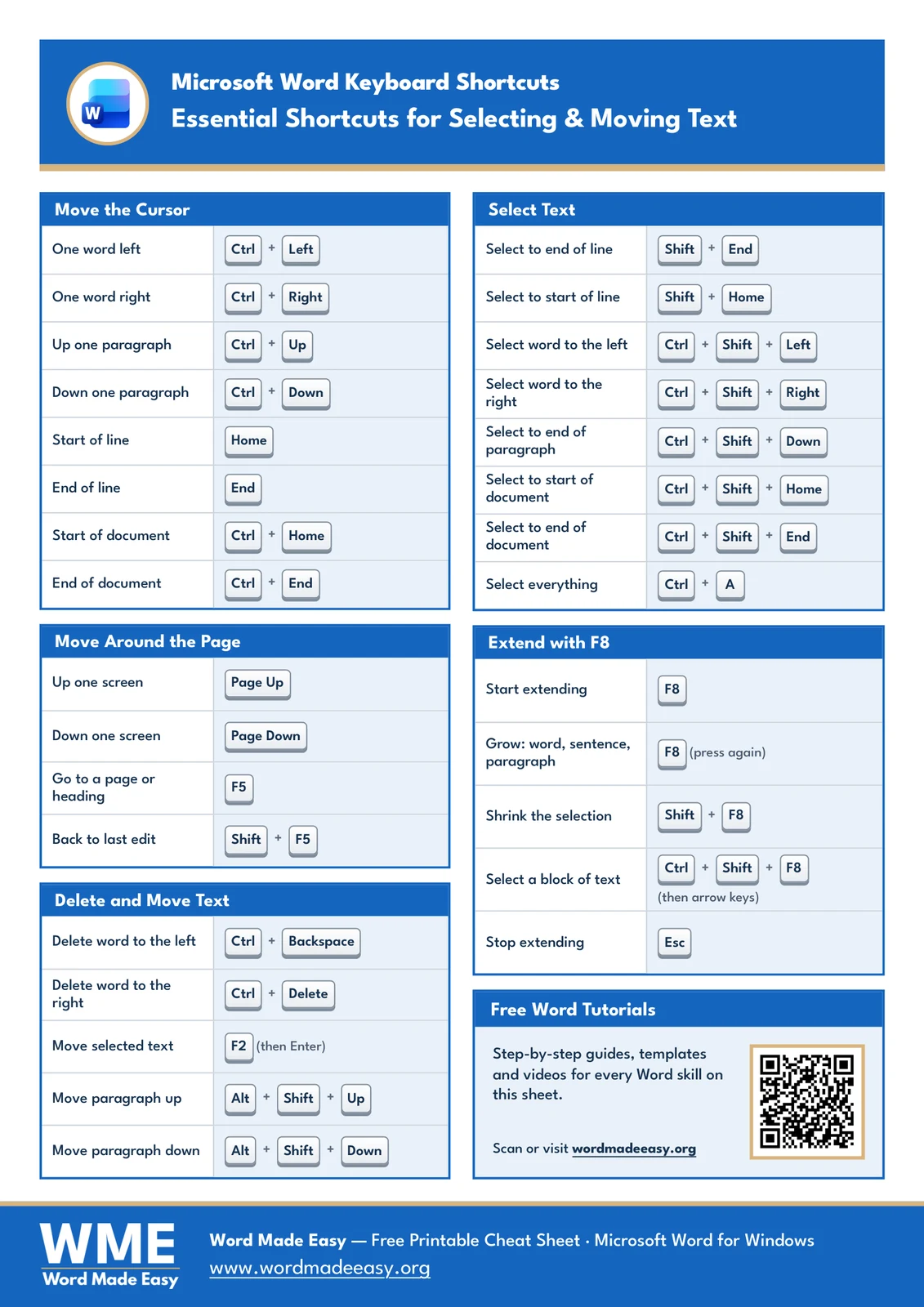
This free cheat sheet lists 30 selecting and moving shortcuts for Word on Windows, in five groups. Every key was checked in desktop Word.
Download the free PDF cheat sheet
The 30 shortcuts fit on one A4 page: moving the cursor, moving around the page, deleting and moving text, selecting text and extending with F8.
Get new free printables first: follow Word Made Easy on Pinterest
How selecting and moving text works
Most selection shortcuts follow one pattern. A movement key, such as Ctrl + Right, moves the cursor. Add Shift and the same movement selects the text it passes over. Learn the movement keys first and the selection keys follow.
Once text is selected, F2 picks it up. Move the cursor to the new spot and press Enter to drop it there. Copy works the same way with Shift + F2.
Move the cursor
Moving the cursor by word, paragraph or line is faster than the mouse, and it is the first step of most selections.
| Action | Shortcut |
|---|---|
| One word left | Ctrl + Left |
| One word right | Ctrl + Right |
| Up one paragraph | Ctrl + Up |
| Down one paragraph | Ctrl + Down |
| Start of line | Home |
| End of line | End |
| Start of document | Ctrl + Home |
| End of document | Ctrl + End |
Move around the page
Jump by screen, or straight to a page or heading, without scrolling.
| Action | Shortcut |
|---|---|
| Up one screen | Page Up |
| Down one screen | Page Down |
| Go to a page or heading | F5 |
| Back to last edit | Shift + F5 |
Delete and move text
Delete whole words, or pick text up and drop it somewhere else. Alt + Shift + Up or Down moves the paragraph the cursor is in.
| Action | Shortcut |
|---|---|
| Delete word to the left | Ctrl + Backspace |
| Delete word to the right | Ctrl + Delete |
| Move selected text | F2 (then Enter) |
| Move paragraph up | Alt + Shift + Up |
| Move paragraph down | Alt + Shift + Down |
Select text
Hold Shift with a movement key to select as you go. Add Ctrl to select a whole word or paragraph at a time.
| Action | Shortcut |
|---|---|
| Select to end of line | Shift + End |
| Select to start of line | Shift + Home |
| Select word to the left | Ctrl + Shift + Left |
| Select word to the right | Ctrl + Shift + Right |
| Select to end of paragraph | Ctrl + Shift + Down |
| Select to start of document | Ctrl + Shift + Home |
| Select to end of document | Ctrl + Shift + End |
| Select everything | Ctrl + A |
Extend a selection with F8
F8 turns on extend mode, so you can grow a selection with each press and finish with Esc.
| Action | Shortcut |
|---|---|
| Start extending | F8 |
| Grow: word, sentence, paragraph | F8 (press again) |
| Shrink the selection | Shift + F8 |
| Select a block of text | Ctrl + Shift + F8 (then arrow keys) |
| Stop extending | Esc |
Frequently asked questions
How do I select a whole paragraph with the keyboard?
Put the cursor at the start of the paragraph and press Ctrl + Shift + Down. Press it again to add the next paragraph.
What does F8 do in Word?
F8 starts extend mode. Press it again to select the word, then the sentence, then the paragraph. Shift + F8 shrinks the selection and Esc stops extending.
How do I move a paragraph up or down in Word?
Put the cursor in the paragraph and press Alt + Shift + Up or Down. It swaps places with its neighbour.
How do I select a block of text in Word?
Press Ctrl + Shift + F8, then use the arrow keys to shape the block. Press Esc when you have finished.
How do I delete a word without selecting it?
Press Ctrl + Backspace to delete the word to the left, or Ctrl + Delete for the word to the right.
More Word cheat sheets
Other free cheat sheets from Word Made Easy, each with its own page and download:
- Word Function Keys: 30 F1–F12 Shortcuts (Free PDF)
- Picture Shortcuts in Word: 22 Keys for Images and Shapes (Free PDF)
- Copilot Prompts for Word: 19 Copy-Ready Prompts (Free PDF)
- Microsoft Word Keyboard Shortcuts Cheat Sheet (Free PDF): the everyday essentials
- Free Microsoft Word Keyboard Shortcuts Bundle: 18 Cheat Sheets (PDF)
Conclusion
Start with the word and line movements, add Shift to select, and use F8 when you need to stretch a selection a long way. Print the sheet and keep it beside your keyboard until the keys feel natural.
For the Mac version, see Word for Mac text selection shortcuts.
Related tutorials
- How to Select All in Word (Whole Document)
- How to Select a Page in Word
- How to Cut, Copy and Paste in Word
Word Tutorials
Recently Added on Word Made Easy
Browse the complete collection for help with formatting, layout, pages, tables, images, and document setup.
For Microsoft support documentation, visit the official Microsoft guidance.




Leave a comment
Stuck on a step, or know a quicker way? Ask or share it below.